
LeReader- Navigate New Tales
Q-VON TECHNOLOGYEntertainment
4.6619.00 Reviews
- Version
- 2.26.0
- Installs
- 500.00K
- Age Rating
- Teen
Screenshots

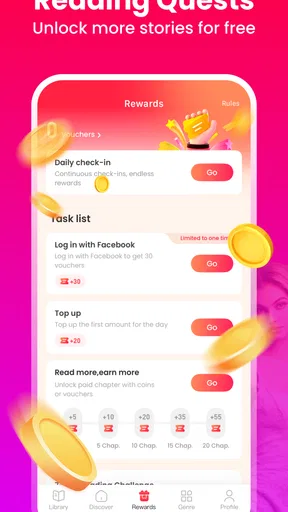
Our Review of LeReader- Navigate New Tales
 Analysis by Appyee
When I first opened LeReader-Fantastic Novels, the appeal was easy to understand: it puts serialized fiction within reach for the small gaps in an ordinary day. I could browse when I had a few minutes, pick up a story, and settle into a reading rhythm without preparing a whole evening for it. That quick first-week novelty is real, but what matters more is whether the app still feels worth opening once the initial curiosity wears off.
LeReader is an entertainment app from Q-VON TECHNOLOGY, and its focus on romance and novels gives it a more specific feel than a general-purpose ebook shelf. The app is free to install, rated Teen, and has a 4.7 average from around 7,600 ratings. That makes it an easy low-commitment trial, though the presence of in-app purchases means I would still pay attention to any purchase prompts while browsing.
From first-week curiosity to a reading habit
I’d judge LeReader’s first-week appeal by whether browsing turns into time spent with a story, not by how many choices catch my eye. A good test is to pick one novel for a familiar spare moment—like a commute—and notice whether I want to return to it the next day. That distinction leads naturally to the bigger question: whether the habit remains useful month after month.
Why the opening sessions work
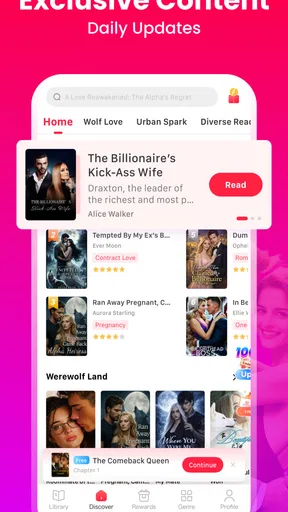
So, what makes LeReader-Fantastic Novels different from the ocean of reading apps out there? For starters, the app boasts a user-friendly interface that makes browsing a breeze. Seriously, I’m all about apps that don’t make you feel like you need a map to navigate them. With LeReader, everything is just a tap away, and that’s just the beginning.
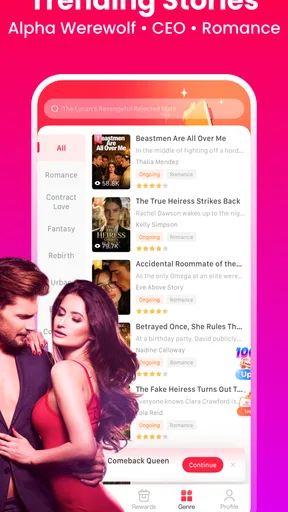
The app offers a wide range of genres to choose from. Whether you’re into spine-chilling thrillers, heartwarming romances, or epic fantasies, there's something for everyone. I found myself getting lost in stories I wouldn’t normally pick up in a bookstore, and that’s part of the magic here. It encourages you to explore and step outside your usual reading comfort zone.
That exploratory quality is most useful when I’m not sure what I want to read next. Rather than searching for a particular author or title, I can treat browsing as a low-pressure way to sample unfamiliar fiction. A practical approach is to give a new story a short trial during a break, then decide whether its voice and pacing suit me before making it part of my regular reading. This keeps discovery enjoyable instead of turning the app into a long hunt for the perfect pick.
For a realistic routine, I’d use it during a bus ride, while waiting for an appointment, or at the end of the day when I want a story but don’t want to set up a book or choose a long video. The short-session convenience is a better reason to keep a reading app installed than the size of its catalogue alone. If I make a habit of returning to one story in those spare moments, LeReader has a chance to become part of my routine rather than an app I open once and forget.
Finding stories without turning browsing into work
One of the features I absolutely adore is the personalized recommendation system. It’s like having your very own librarian who knows exactly what you might enjoy next. The more you read, the smarter it gets, suggesting novels that align with your tastes. It’s a great way to discover new authors and stories that you might not have stumbled upon otherwise.
Recommendations are most helpful when I use them as a starting point, not as a verdict. If a suggestion catches my eye, I can sample it; if it doesn’t, I can return to a genre or mood I already know I enjoy. That small distinction matters because no recommendation system can fully account for why I want a particular kind of story on a particular day. A quiet romance and a fast-moving fantasy can both appeal to me, but not necessarily at the same time.
One useful habit is to notice which kinds of recommendations keep drawing me in, then browse with that preference in mind instead of tapping through every available option. It makes discovery more intentional and helps prevent a crowded reading list from becoming a second chore. I’d also avoid treating a recommendation as a promise that a story will match my taste; the value is in surfacing possibilities I might otherwise overlook.
Compared with a general ebook reader, LeReader puts more emphasis on discovering ongoing entertainment than on managing a personal library of books I already own. Compared with reading a novel on a website in a browser, a dedicated app is more convenient for returning to a story and settling into a consistent reading setup. If my priority were a carefully organized collection of purchased ebooks, broad file support, or a familiar author’s complete backlist, I would look at a traditional ebook platform instead. LeReader makes most sense when I want to explore fiction inside the app.
Reading on my schedule, online and offline
Another neat feature is the offline reading mode. Let’s face it, not everywhere we go has reliable internet access. Having the ability to download your novels and read them offline is a game-changer for those long commutes or spontaneous weekend getaways.
The practical tip here is to prepare before leaving a dependable connection: choose what I genuinely expect to read and make it available offline, rather than assuming I’ll be able to browse once I’m on the move. That simple step turns an interrupted commute or a patchy connection into useful reading time. It also encourages a more deliberate choice, since I’m deciding in advance which story deserves the limited attention I have during a trip.
Offline access is useful for travel and dead zones, but it doesn’t remove every trade-off. The discovery side of a reading app is naturally easier when I can browse, and downloading stories ahead of time requires a little planning. I’d keep one current read ready for offline moments and do my searching when I have a connection. That workflow is more reliable than opening the app at the last minute and expecting every part of the experience to be available.
Small adjustments that support longer sessions
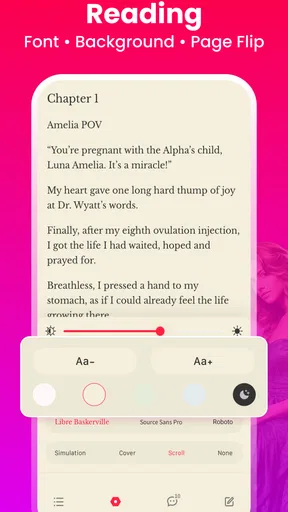
The design of the app is sleek and modern, yet it doesn’t overcomplicate things. The reading interface is customizable, allowing you to adjust font sizes, background colors, and even the brightness to suit your preferences. Personally, I love reading at night, so the night mode feature has been a blessing for my eyes.
These controls matter most when I’m reading at different times of day. I can use a more comfortable display for a dim room and change the text size when I want a relaxed session rather than leaning toward the screen. My tip is to settle the reading appearance before getting absorbed in a story; repeatedly adjusting it mid-chapter can break the flow. A comfortable setup also makes it easier to return the next evening, which is a small but meaningful part of building a habit.
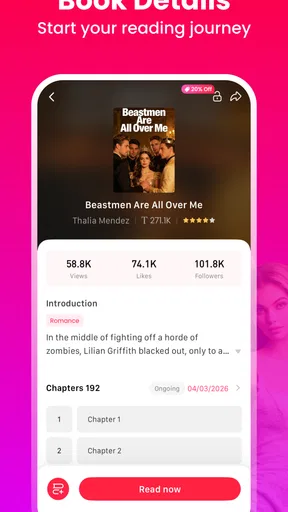
Navigation is smooth, with intuitive gestures that make flipping through pages feel natural. It’s like the app anticipates what you want to do next, making the whole reading journey seamless and enjoyable.
That ease has a limit: a smooth interface can make it tempting to keep browsing instead of actually reading. I try to choose a story first and then give it a proper stretch of attention, rather than switching as soon as another cover looks interesting. That is especially helpful for readers who enjoy sampling many novels but want to finish more of the stories they begin.
Community, motivation, and the point where it can feel busy
For those who love to interact with fellow readers, the community aspect of LeReader is quite engaging. You can join discussions, leave reviews, and even connect with authors. It adds an extra layer of depth to your reading experience, making it more than just flipping through digital pages.
I see the social side as an optional extra, not a requirement for enjoying the novels. It can be valuable when I want to compare reactions or see how other readers interpret a story, but it can also pull attention away from reading itself. A useful boundary is to finish a chapter before checking discussions, especially if I’m trying to avoid spoilers or simply want to keep the story’s mood intact.
Readers who like talking about what they read may find this more satisfying than a solitary ebook app. Someone who wants a quiet, distraction-free reading space may prefer to ignore the community features and focus on the text. Neither approach is wrong; the important thing is to use the social layer when it adds something, rather than feeling obliged to participate just because it is available.
Month-to-month value and the maintenance it asks of me
LeReader has over 500,000 installs, and its current version is 2.24.1. The app supports devices running Android 7.0 or later, so it can suit people using older Android phones as well as newer ones. I like that the basic decision is simple: it is free to install, while in-app purchases range from $0.99 to $349.99 per item. Those purchases make it worth checking the cost of any optional item before confirming it, particularly if I’m just testing whether the app fits my reading habits.
In practical terms, the maintenance burden seems less about managing a complicated library and more about keeping my reading choices under control. I would periodically review which stories I’m actually following and stop opening ones that no longer interest me. This is not a special app trick; it is a way to keep the experience from turning into an endless queue of unfinished fiction. A focused handful of current reads is easier to return to than a long trail of half-started stories.
The app is a good fit for readers who enjoy romance and other fiction, like discovering unfamiliar stories, and often read in short sessions. It is less suited to someone who only wants a specific bestseller, prefers to buy and keep individual ebooks, or dislikes in-app purchasing options. For those readers, a conventional bookstore or library app may offer a better match, especially when the goal is to search for a known title rather than browse for the next serial.
For parents choosing reading apps, the Teen content rating is worth considering alongside the stories a young person may encounter. I would make that decision based on the intended reader and the kind of material they are comfortable with, rather than assuming that a novel-focused app will suit every age. The same thoughtfulness applies to purchases: free installation lowers the barrier to trying it, but it is sensible to review purchase choices before handing over a device.
When the novelty fades
The biggest source of fatigue for me is not the act of reading; it is the possibility of browsing too long, following too many stories, or letting social activity interrupt a chapter. A recommendation feed can keep presenting tempting options, but more choice is not always more enjoyment. If I notice myself opening the app, scrolling, and leaving without reading, I’d switch to a deliberate routine: pick one story before a commute or decide on a short reading window before bed.
Another trade-off is that a fiction-focused service cannot replace every kind of reading tool. It is not the first place I would turn for reference books, a carefully curated collection of ebooks I already own, or a reading setup centered on a particular author. LeReader’s value is strongest when the pleasure comes from finding and following stories, especially romances, rather than from owning a permanent digital bookshelf.
That distinction helps answer whether it deserves lasting space on a phone. I would keep it if I were regularly returning to a few novels, using offline reading on commutes, or enjoying the community without letting it take over. I would remove it if I found that I only browsed occasionally, never settled on a story, or preferred a different source for the books I want. A reading app earns its place through repeat use, not through the promise of endless choice.
Final thoughts on keeping it installed
All in all, LeReader-Fantastic Novels is a delightful app that brings the joy of reading to your fingertips. It’s perfect for anyone who loves to explore new worlds through literature. With its broad selection of genres, personalized recommendations, and community features, it’s more than just a reading app; it’s a gateway to endless adventures.
So, if you’re ready to dive into a sea of stories and unleash your inner bookworm, give LeReader a try. Who knows? You might just find your next favorite novel waiting for you.
My longer-term recommendation is to treat the first few sessions as a test of fit. Pick a story that genuinely interests you, adjust the reading display for your usual setting, and see whether you naturally want to return to it the next day. If that routine sticks, the app’s mix of discovery, offline access, and reader interaction can provide recurring value. If not, there is no need to keep it installed just because there are more stories to explore.
Verdict
Strengths of LeReader- Navigate New Tales
- Diverse novel genres available.
- User-friendly interface design.
- Offline reading mode supported.
- Customizable reading settings.
- Regular updates with new content.
Limitations of LeReader- Navigate New Tales
- Limited free content access.
- In-app purchases can be costly.
- Ads can interrupt reading.
- Requires account sign-up.
- Occasional app crashes.
Similar Picks in This Category
View All
Google Play Games
Google LLC3.9

Netflix
Netflix, Inc.4.8

YouTube Kids
Google LLC4.2

Disney+
Disney4.4

Prime Video
Amazon Mobile LLC4.7

Steam
Valve Corporation3.2
Frequently Asked Questions
What types of novels can I find on LeReader-Fantastic Novels?
LeReader-Fantastic Novels offers a wide range of genres, including fantasy, romance, sci-fi, mystery, and more. Whether you're into epic tales of adventure or love stories, this app has something for every reader. The library is continually updated with new titles, ensuring fresh content to explore.
Is LeReader-Fantastic Novels free to use?
LeReader-Fantastic Novels offers both free and premium content. While there are many novels available at no cost, some premium novels or chapters may require in-app purchases or a subscription. This allows access to exclusive content and removes ads for an enhanced reading experience.
Can I read novels offline on LeReader-Fantastic Novels?
Yes, LeReader-Fantastic Novels allows you to download novels for offline reading. This feature is especially useful for users who wish to enjoy their favorite books without the need for an internet connection. Simply download the novels while online, and access them anytime, anywhere.
How user-friendly is the LeReader-Fantastic Novels interface?
LeReader-Fantastic Novels boasts an intuitive and user-friendly interface. It includes features like customizable reading settings, bookmarks, and a sleek design for easy navigation. Whether you're a tech-savvy reader or a beginner, you'll find the app easy to use and enjoyable.
Does LeReader-Fantastic Novels offer personalized recommendations?
Yes, LeReader-Fantastic Novels provides personalized recommendations based on your reading history and preferences. The app uses algorithms to suggest novels that match your interests, making it easier to discover new authors and stories you might enjoy. This feature enhances the overall reading experience.
